Which AI subscription should you buy?
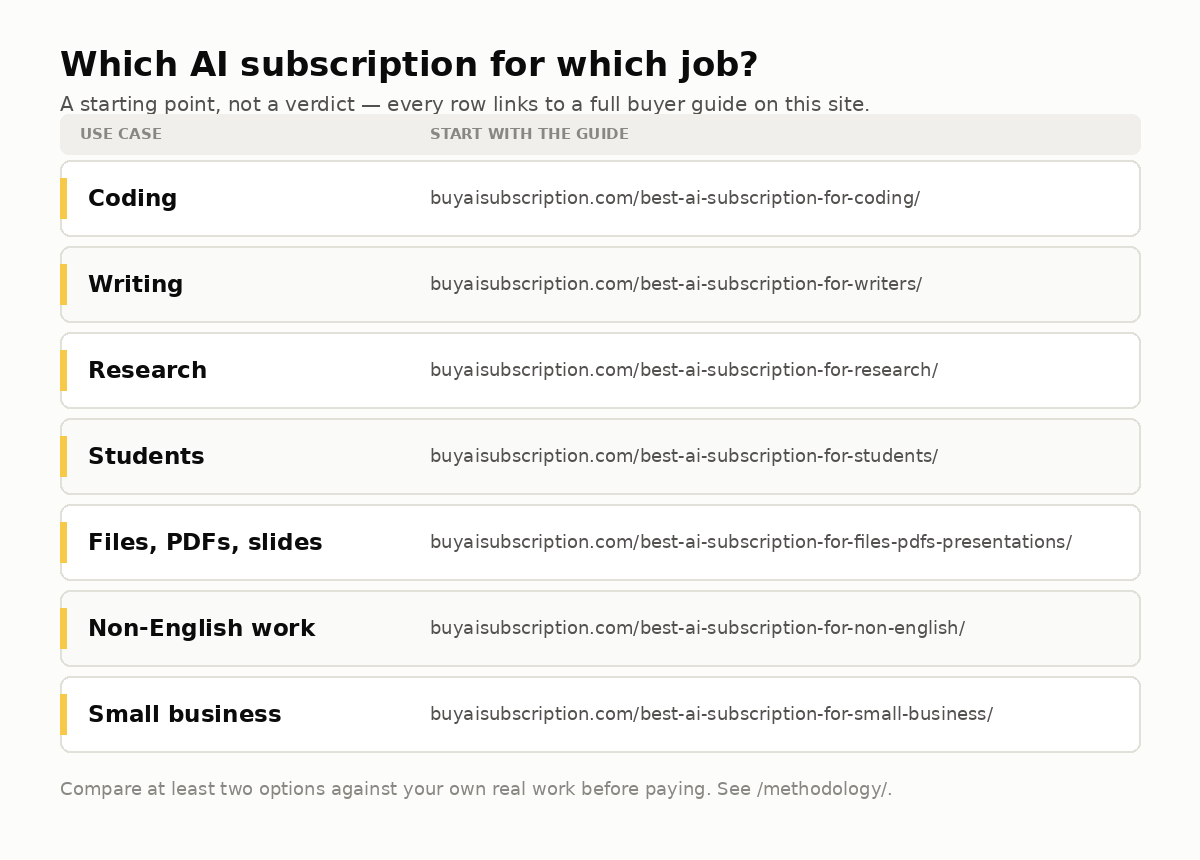
Most people do not need five AI subscriptions. They need one main plan, maybe one specialist, and a clear understanding of current prices, usage limits, cancellation, privacy, files and what paid AI actually gives them.
Prices, limits and plan names change often. Always confirm final details on the official provider page before buying.
What to buy depends on the job, not the logo.
The right AI subscription is the one that handles your daily work with acceptable limits, privacy and cost.
ChatGPT
Best first choice for many people: writing, coding, images, files, voice, research and general problem solving in one product.
Claude
Strong when the work is long-form writing, rewriting, document review, tone and careful explanations.
Perplexity
Useful when you want answers with citations, web research and quick comparison of public sources.
MultipleChat
Useful when you want multiple models in one place, side-by-side answers, AI collaboration, files, OCR and studios for documents, presentations and spreadsheets.
Microsoft Copilot
Most natural when your company already lives in Microsoft 365, Teams, Word, Excel and admin-controlled accounts.
Gemini
Worth checking if your workflow is Gmail, Docs, Drive, Sheets, Android and Google Workspace.
What the main AI subscriptions cost right now.
As of 20 July 2026, these are the official plan anchors worth checking before you buy. Taxes, country availability, app-store pricing, annual discounts and usage limits can change, so always click through to the official page before paying.
| Provider | Common paid plans | Buy when... | Do not buy when... | Official source |
|---|---|---|---|---|
| ChatGPTOpenAI | Plus $20/mo, Pro $200/mo, Team $25/user/mo annual or $30 monthly. | You want one broad assistant for writing, coding, files, images, voice, data analysis and everyday work. | You only need sourced search or one narrow workflow. | OpenAI pricing |
| ClaudeAnthropic | Pro $20/mo or $200/year; Max 5x $100/mo; Max 20x $200/mo. Team Standard/Premium also available. | You need careful writing, long document reasoning, code review, structured analysis or calmer business prose. | You mainly need image generation, Microsoft/Google integration or cited web answers. | Claude pricing |
| Google AIGemini | AI Plus $4.99/mo, AI Pro $19.99/mo, AI Ultra from $99.99/mo with higher option at $199.99/mo. | Your workflow lives in Gmail, Docs, Drive, Photos, Android, NotebookLM or Google creative tools. | You do not use Google products heavily. | Google AI subscriptions |
| Perplexity | Pro is the research subscription; Max is listed at $200/mo or $2,000/year. | You need cited web research, source discovery, fact-checking and fast orientation. | You need a full creative suite, office assistant or broad coding/file workflow. | Perplexity Pro / Max |
| Microsoft Copilot Pro | Copilot Pro is listed at $20/user/month. | You use Microsoft 365 apps and want AI close to Word, Excel, PowerPoint, Outlook and Windows. | You are outside Microsoft workflows or only want a standalone chatbot. | Microsoft Copilot Pro |
| Poe | Subscriptions start at $4.99/mo and use compute points. | You want many bots/models, media tools and point-based multi-model access. | You want the native app features and support of one provider. | Poe purchases FAQ |
| MultipleChat and other multi-model tools | Verify current pricing on the official site. | You compare several models, want side-by-side answers, or prefer one workspace for multiple AI providers. | You only use one native model and never compare outputs. | MultipleChat |
How much should a normal user spend?
Do not start by buying the most expensive plan. Start with the cheapest plan that removes your real bottleneck.
Free first
Use free plans if you ask occasional questions, write short drafts, translate simple text, brainstorm, or are still learning what AI can do.
Light paid
Consider low-cost plans like Google AI Plus or Poe entry plans when you want a small upgrade but do not use AI daily.
Main paid plan
This is the normal buyer zone: ChatGPT Plus, Claude Pro, Google AI Pro, Copilot Pro, Perplexity Pro and similar plans.
Power tier
Only buy Max, Pro, Ultra or high-capacity tiers if you hit limits doing valuable work several days per week.
Choose your subscription in five questions.
Do you use AI less than three times a week?
Stay free. Paying only makes sense when limits interrupt repeated work.
Is your work mostly general assistant work?
Start with ChatGPT Plus or another broad default. It covers the widest range before you add specialists.
Is the output mostly writing or long documents?
Test Claude Pro against ChatGPT Plus with the same document and choose the one that needs fewer edits.
Is the job mostly research with public sources?
Test Perplexity first. A sourced answer workflow is different from a general chatbot workflow.
Do you constantly open several AI tabs?
Then compare multi-model tools like Poe, MultipleChat or TypingMind. The value is reducing tab switching and comparing outputs, not replacing every native app.
Which AI subscription to buy for each situation.
| Your situation | Likely best buy | Why | Check before paying |
|---|---|---|---|
| I want one AI for everything | ChatGPT | Broadest general product for writing, code, files, images and everyday tasks. | Message limits, file limits, plan features and whether your work needs team privacy. |
| I write proposals, emails, legal-ish text or reports | Claude or ChatGPT | Claude is often strong for careful prose; ChatGPT is broader when text becomes charts, images or data. | Upload limits, document handling and company policy. |
| I need research with sources | Perplexity | Designed around web answers and citations. | Source quality, freshness and whether the answer cites official pages. |
| I pay for too many AI tools | MultipleChat | All-in-one access can reduce duplicate subscriptions and lets you compare models side by side. | Included models, credits, file costs and whether your favorite model is available. |
| My company uses Microsoft 365 | Copilot | Better fit for Word, Excel, Teams, Outlook and admin controls. | Tenant setup, licensing, data controls and employee training. |
| I live inside Google products | Gemini | Most convenient for Google Workspace users. | Whether it actually improves your Docs/Gmail/Drive workflow enough to justify payment. |
| I work with big PDFs, scans, PPTX or Excel | ChatGPT, Claude or MultipleChat | File capability matters more than model hype. MultipleChat can stand out with up to 200MB files, OCR via Mistral, Document Studio, Presentation Studio and Excel Studio. | File size, OCR quality, export formats and whether heavy file usage costs extra. |
How AI subscriptions actually work.
Many users think paying means “unlimited AI.” It usually does not. A paid plan unlocks better access, but every provider still manages cost, speed and safety through limits.
Plans unlock model access
Free plans may use smaller models, lower priority or tighter limits. Paid plans usually unlock stronger models, newer features, file tools, image generation, voice or research modes.
Limits still exist
Paid plans can still have message caps, file caps, token limits, context limits, image generation limits, rate limits or “try again later” messages during high demand.
Features can differ by country and platform
A feature may work in the web app but not the mobile app, or in the US before Europe. Browser, iOS, Android, desktop and enterprise accounts can differ.
Billing can be direct or app-store based
If you subscribe through Apple, Google or another app store, cancellation and refunds often happen there, not inside the AI product website.
Team plans are not just “more seats”
Team and Business plans can add admin controls, shared workspace, separate billing, privacy controls, higher limits or data-processing terms.
Enterprise is a procurement product
Enterprise plans often involve sales, security review, SSO, audit logs, compliance documents, custom limits and contracts. They are not usually bought with one click.
What happens to your prompts, files and company data?
This is the part many buyers skip. Do not upload sensitive work until you understand training, retention, sharing and admin controls.
Can your data train AI?
Consumer, free, team and enterprise plans may have different settings. Look for “improve model for everyone,” “training opt-out,” “data controls” or business privacy terms.
How long is data stored?
Chats, uploaded files, logs and abuse-monitoring data may have separate retention rules. Deleting a chat is not always the same as deleting all backend logs.
Uploaded files are sensitive
PDFs, spreadsheets, contracts, resumes, medical notes and customer lists can include personal data. Use redaction, company accounts and approved tools.
Admin controls matter
For teams, check SSO, user management, workspace ownership, sharing, audit logs, export controls and whether employees can connect private accounts.
DPA / AVV / data terms
Companies may need data-processing agreements, regional clauses and internal AI policies. This is not optional for regulated or customer data.
Use the least sensitive version
Remove names, emails, financial details, medical data and customer identifiers when you only need structure, tone or general analysis.
How cancellation usually works.
Cancellation is simple when you subscribed directly. It becomes confusing when payment went through an app store, team admin, reseller or annual contract.
Direct website billing
Usually cancel from account settings, billing settings or plan management. Your access often continues until the end of the billing period.
Apple or Google billing
If the subscription was bought in an app, cancel through Apple Subscriptions or Google Play, not only inside the AI app.
Team and business seats
Only admins may cancel or remove seats. Removing a user does not always cancel the entire workspace subscription.
Annual plans
Annual discounts may not refund unused months. Read renewal and refund terms before switching from monthly to yearly.
Keep proof
Screenshot the cancellation confirmation and check the next invoice date. This avoids “I thought I cancelled” problems.
Export first
Before cancelling, export important chats, files, custom instructions, GPTs, projects or team data where possible.
When a free AI tool is enough, and when it is not.
| Need | Free may be enough when... | Paid is better when... |
|---|---|---|
| Learning AI | You are testing prompts, asking simple questions or learning basics. | You use it every day and want stable access. |
| Writing | You write short emails, posts or outlines. | You need long context, saved projects, tone consistency and fewer caps. |
| Research | You only need quick orientation. | You need cited sources, deeper reports and repeatable workflows. |
| Files | You upload small, non-sensitive files occasionally. | You work with PDFs, scans, Excel, PPTX, OCR or client documents. |
| Business use | Rarely. Free personal accounts are risky for company data. | You need privacy controls, admin, billing, support and policy compliance. |
Continue comparing before you buy.
These related pages cover limits, alternatives, model comparisons, presentations, paraphrasing and subscription scoring.
Read the detailed subscription guides.
These pages answer the questions users usually ask after the first headline: what a subscription includes, how free limits work, how to cancel, what happens to data and how companies should buy AI tools.
Models, limits, files, billing routes, team plans and enterprise basics.
When free AI is enough and when a paid AI subscription makes sense.
Direct billing, Apple, Google Play, annual plans, team seats and proof.
Training, retention, file uploads, DPA, employee policy and sensitive data.
Team plans, enterprise questions, admin controls and company workflow fit.
Is this AI subscription worth paying for?
These pages answer the high-intent buyer questions around specific tools: who should pay, who should skip, what to test, and where to verify official pricing.
Best first paid AI for many general users.
For careful writing, long documents and tone.
For Google Workspace, Gmail, Docs and Android users.
For cited research and web answers.
For all-in-one model access, files, OCR and studios.
Best AI subscription by real job.
These pages capture the long-tail searches from people who do not care about model drama. They want to know what to buy for studying, writing, coding, research, small business, languages or files.
Study help, policy risk and free-plan choices.
Tone, revision, structure and editorial workflow.
Debugging, code context, tests and IDE fit.
Citations, verification, source quality and reports.
Billing, employees, customer data and workflow fit.
Translation, local idiom and multilingual writing.
PDF, scanned PDF, PPTX, XLSX, OCR and file limits.
Questions people ask right before buying or cancelling.
These pages handle the awkward practical details: discounts, monthly versus annual billing, refunds, duplicate subscriptions and switching tools without losing work.
How to check discounts without trusting fake coupon pages.
When annual lock-in is worth it, and when monthly is safer.
Provider billing, Apple, Google Play and renewal problems.
When a tool stack is smart and when it is waste.
Export chats, prompts, files, projects and team data first.
Why people regret buying AI subscriptions.
Most bad purchases are predictable. They come from buying a famous product before testing the actual workflow.
They confuse model quality with workflow fit
A smart model still feels useless if it cannot handle your files, apps, language, privacy rules or export format.
They buy annual too early
AI products change quickly. Test monthly for at least one billing cycle before accepting annual lock-in.
They ignore limits
Paid plans can still cap messages, images, file uploads, context, voice, deep research, video and peak-time access.
They upload sensitive data casually
Customer lists, contracts, medical notes, source code and HR files need approved plans and privacy review.
They pay for overlapping tools
Two broad chatbots may duplicate each other. A better stack is one general assistant plus one specialist.
They forget cancellation route
If you bought through Apple, Google, Stripe, web checkout or a team workspace, cancellation happens in different places.
Questions people ask before buying AI subscriptions.
Which AI subscription should I buy first?
For most people, buy none first: test free versions with real work. If you need one paid plan, ChatGPT is the safest general starting point. Choose a specialist only when your workflow clearly demands it.
Is ChatGPT Plus worth it?
It can be worth it if you use AI daily for writing, coding, files, images, analysis or work planning. If you only ask occasional questions, free access may be enough.
Should I buy Claude instead of ChatGPT?
Claude is often excellent for careful writing and document-heavy work. ChatGPT is usually broader. The right answer depends on whether you need prose quality or all-around tooling.
Should I buy Perplexity?
Buy Perplexity if your main need is research with sources. Do not buy it expecting it to replace every creative, coding, image or workflow feature of a general AI assistant.
Should I buy MultipleChat?
It is useful if you want several models in one subscription, compare answers side by side, use AI collaboration or work with files, OCR, documents, presentations and spreadsheets in one place.
Do paid AI plans remove all limits?
No. Paid plans usually raise limits and unlock features, but message caps, file caps, speed limits and model availability can still apply.
What happens after I cancel?
Usually access continues until the end of the billing period. You may lose paid features, higher limits, team controls or access to some stored outputs later. Export important content first.
Can I share one AI subscription with my team?
Personal account sharing may violate terms or create security problems. Use a Team, Business or Enterprise plan when multiple employees need access.
Is it safe to upload company files?
Only after checking the provider’s business privacy terms, training settings, retention, DPA and your company policy. For sensitive files, use approved business accounts.
Can AI subscriptions replace employees?
No serious buyer should think that way. AI subscriptions assist writing, research, coding, analysis and workflows, but humans remain responsible for quality, decisions, ethics and compliance.
Can I use AI for legal, medical or financial work?
Use it carefully and verify with qualified professionals. AI can help summarize, draft or organize, but it can be wrong and should not be the final authority.
Why do AI prices change?
Providers change models, compute costs, features, limits and plan names. Treat every buyer guide as time-sensitive and check official pages before buying.